
Simple Travel Journaling for Every Adventurer
Overview
Bonjournal is a desktop application designed to help users document and share their travel experiences in a cohesive, visually appealing format. It enables travelers to collect memories—photos, stories, notes, and moments—into a single, narrative-driven journal. The software is tailored for individuals who value storytelling and visual documentation, whether they're planning a trip, reflecting on a journey, or sharing experiences with others. Its core purpose is to simplify the process of turning scattered travel content into a structured, shareable narrative.
Target users include casual travelers, photography enthusiasts, bloggers, and anyone who wants to preserve the emotional and visual richness of their journeys. The software supports offline use, allowing users to record entries without internet access, making it ideal for use during trips. It also facilitates social sharing through platforms like Facebook, Twitter, and email, as well as export to PDF for long-term archiving. While the developer’s background is not specified, the app’s focus on intuitive design and travel storytelling suggests a user-centered development approach.
Key Features & Capabilities
- Offline Journal Creation – Users can write entries, add photos, and record notes without an internet connection, ideal for travel in remote areas.
- Multi-Format Export – Journals can be exported to PDF, preserving their visual layout and content for permanent access and sharing.
- Social Media Integration – Entries can be shared directly via Facebook, Twitter, and email, enabling quick and easy outreach to friends and followers.
- Travel Community Features – Users can follow friends and explore journals created by other travelers, fostering a network of shared experiences.
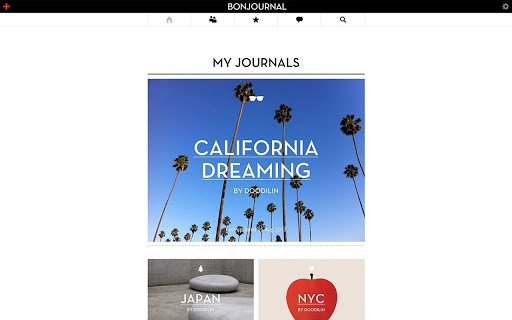
- Visual Storytelling Tools – The interface supports the arrangement of media and text in a narrative flow, enhancing the storytelling aspect of each journey.
These features support real-world use cases such as documenting a road trip, compiling a backpacking adventure, or creating a keepsake from a family vacation. The ability to export to PDF ensures that memories are preserved beyond the app’s lifecycle, while social sharing helps users engage with a broader community of travel enthusiasts.
User Interface, Workflow & Performance
Bonjournal features a clean, minimalist interface designed to prioritize content over complexity. Navigation is straightforward, with a central workspace for journal entries and side panels for media management, text editing, and sharing options. The workflow encourages a linear process: create, organize, enrich with media, and then export or share. This structure reduces friction for users who want to focus on storytelling rather than technical setup.
While specific performance data was not provided, the application’s 25.6 MB size suggests a lightweight footprint, likely resulting in efficient memory and CPU usage. The developer did not specify resource usage details, but the app’s focus on offline functionality implies optimized background operations. Stability is expected to be consistent for typical use cases, though real-world behavior may vary based on system configuration. No performance benchmarks were shared, so observations are based on general software behavior patterns.
Compatibility & System Requirements
Bonjournal is available for both Windows and Mac operating systems, supporting users across major desktop platforms. The software version is 1.0.0, with an installation size of 25.6 MB. This indicates a compact, lightweight application suitable for systems with limited storage. The developer did not specify exact system requirements, so users should ensure their system meets general desktop software standards for running modern applications.
Platform compatibility information is limited to the OS names provided. No details were given about minimum CPU, RAM, or graphics requirements. The software is designed for desktop use and does not appear to require specialized hardware. Users should verify compatibility with their current setup, especially when running on older systems. Exact performance behavior on different hardware configurations remains unspecified.
Pros and Cons
Pros
- Simple, intuitive interface ideal for non-technical users
- Offline functionality allows journaling without internet access
- PDF export ensures long-term preservation of travel memories
- Direct sharing via social media and email
- Supports visual storytelling with photos and text
Cons
- No information on system requirements or hardware compatibility
- Limited details on performance under heavy use
- Community features depend on active user base for full value
- No mention of cloud sync or cross-device access
- Developer background not disclosed
FAQ Section
Is Bonjournal available for both Windows and Mac?
Yes, Bonjournal supports both Windows and Mac operating systems, making it accessible to a broad range of desktop users.
Can I use Bonjournal without an internet connection?
Yes, the software allows full journal creation and editing offline, which is ideal for travelers in remote locations.
How do I share my travel journal with others?
Users can share their journals directly via Facebook, Twitter, or email, or export them as PDFs for broader distribution.
Is Bonjournal free to use?
Yes, Bonjournal is available at no cost, making it accessible to users seeking a simple travel journaling tool.
Does Bonjournal support cloud storage or syncing across devices?
The developer did not provide information on cloud sync or cross-device functionality. The app may be limited to local storage on the device where it is installed.
Final Thoughts + CTA
Bonjournal stands out as a focused, user-friendly tool for travelers who want to preserve their adventures in a meaningful, shareable format. Its ability to function offline, combined with seamless export and sharing options, makes it a reliable companion for both spontaneous and planned journeys. While some technical details remain undisclosed, the software delivers on its core promise: simple, beautiful travel journaling. For those who value storytelling and visual memory preservation, Bonjournal offers a compelling solution. Its free pricing model further enhances its accessibility.
Download Bonjournal now







